Does computer vision syndrome need a $400 lens upgrade, or a $10 bottle of eye drops? It genuinely depends on what’s actually causing your specific symptoms — and the treatment costs for this condition span that entire range because “computer vision syndrome” isn’t one problem. It’s an umbrella term for several distinct, separately treatable issues that happen to share a common trigger: sustained screen use.
The American Optometric Association estimates 50-90% of people who work at computers experience some symptoms of computer vision syndrome — eye strain, dry eyes, blurred vision, headaches, and neck/shoulder pain associated with prolonged screen use. Treatment cost depends entirely on which of these underlying mechanisms is driving your symptoms.
Treatment Costs by Root Cause
| Root Cause | Treatment | Typical Cost |
|---|---|---|
| Uncorrected/outdated refractive error | Updated eye exam + new glasses/contacts | $250-$600 |
| Dry eye from reduced blink rate | Artificial tears, humidifier, blink reminders | $10-$40 |
| Moderate-severe dry eye | Prescription dry eye drops (Restasis, Xiidra, Cequa) | $500-$700/month without insurance |
| Accommodative/focusing fatigue | Computer-specific or anti-fatigue lenses | $200-$400 |
| Poor ergonomics/screen positioning | Monitor arm, desk setup adjustment | $30-$150 |
| Comprehensive diagnostic exam | Full eye exam with binocular vision assessment | $100-$250 |
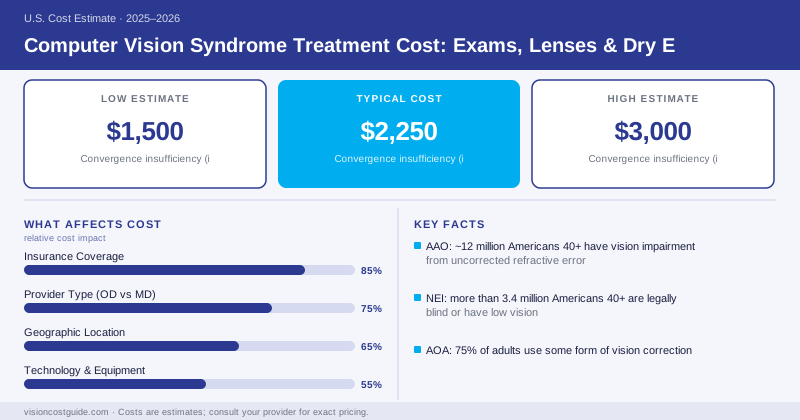
| Convergence insufficiency (if present) | Vision therapy | $1,500-$3,000 full course |
Step One Is Always Diagnosis, Not Treatment
Because computer vision syndrome has several distinct possible root causes, the correct first expense is a comprehensive eye exam ($100-$250) that specifically evaluates refractive error at intermediate/computer distance, tear film quality, and binocular coordination — not just a standard distance-vision check. Skipping this step and buying blue-light glasses or expensive lenses without understanding the actual cause is one of the most common ways people spend money on this condition without improving their symptoms.
When the Answer Is Dry Eye, Not Glasses
Reduced blink rate during screen focus — well-documented to drop by roughly half during concentrated computer work — leads to faster tear film evaporation and dry eye symptoms that mimic or worsen eye strain. For mild cases, over-the-counter preservative-free artificial tears ($10-$25) combined with the 20-20-20 rule (a 20-second break to view something 20 feet away every 20 minutes) resolve a meaningful share of complaints at minimal cost.
For moderate-to-severe dry eye that doesn’t respond to OTC drops, prescription anti-inflammatory dry eye medications like cyclosporine (Restasis, Cequa) or lifitegrast (Xiidra) are a significant cost jump — $500-$700/month at list price without insurance, though most patients pay a much smaller copay with prescription drug coverage and manufacturer savings programs. These medications take weeks to months to show full effect and are meant for chronic management, not quick symptom relief, so budget for an ongoing monthly cost rather than a one-time fix if your doctor prescribes one of these.
When It’s Actually a Focusing or Alignment Problem
A smaller subset of computer vision syndrome cases stem from convergence insufficiency — difficulty comfortably turning both eyes inward for sustained near work — which causes eye strain, double vision, and headaches specifically during close, prolonged tasks like screen use or reading. This is diagnosed through a binocular vision assessment during a comprehensive exam and, when confirmed, treated with a structured course of vision therapy, typically $1,500-$3,000 for a full program of weekly sessions — a considerably bigger investment, but one aimed at a specific, diagnosable mechanical cause rather than general screen fatigue.
The Cheapest Fixes Are Often Overlooked
Ergonomic adjustments — positioning the monitor roughly an arm’s length away with the top of the screen at or slightly below eye level, reducing glare from overhead lighting or windows, and increasing text size to reduce squinting — cost $0-$150 (mostly for a monitor arm or anti-glare screen filter) and meaningfully reduce strain for many people, independent of any lens or medication purchase. These are worth trying alongside, not instead of, an eye exam.
Insurance Coverage
The diagnostic eye exam and any prescribed corrective lenses are covered under standard vision insurance benefits. Dry eye treatment, including prescription medications, is covered under medical/pharmacy insurance benefits since dry eye disease is a medical diagnosis. Vision therapy for diagnosed convergence insufficiency is sometimes covered under medical insurance when billed with appropriate diagnostic codes — check with your insurer before committing to a full program.
Persistent headaches, double vision, or significant eye strain that doesn’t improve with basic measures (breaks, artificial tears, ergonomic changes) warrants a comprehensive binocular vision evaluation rather than continued trial-and-error with over-the-counter products. An underlying convergence or focusing problem won’t resolve on its own and tends to worsen with continued unaddressed near work.
Bottom Line
Get evaluated before you spend on treatment — computer vision syndrome has multiple distinct causes with very different price tags attached, and the exam is the only way to know which one you’re actually dealing with.